

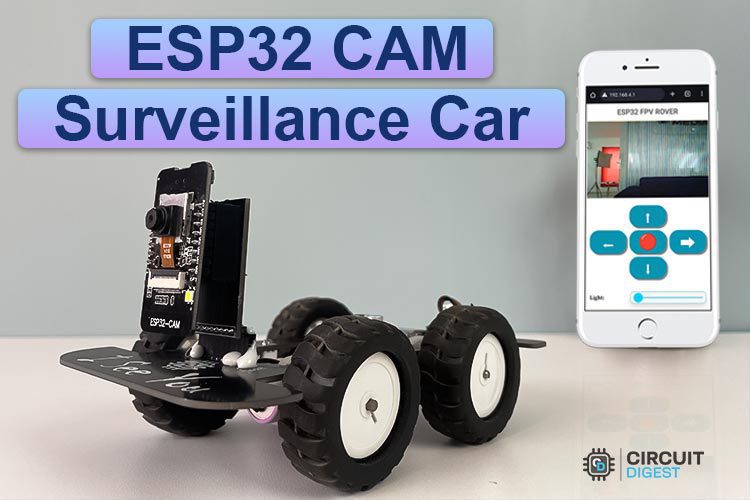
| Composants | ₹ 100,00 |
| ESP32 Cam | ₹ 450,00 |
| Module de pilote de moteur MX1508 | ₹ 40,00 |
| Moteurs N20 + roues de 44 mm | ₹ 200,00 |
| Batterie | ₹ 100,00 |
| PCB | ₹ 100,00 |
| Total | ₹ 990,00 |
Code
/*
* Nom du projet: Spy Rover
* Description du projet: Firmware pour espionnage rover basé sur la ESP32
* Auteur: Jobit Joseph
* Droit d’auteur © Jobit Joseph
* Droit d’auteur © Semicon Media Pvt Ltd
* Droit d’auteur © Circuitdigest.com
*
* Ce programme est un logiciel libre : vous pouvez le redistribuer ou le modifier
* selon les termes de la Licence publique générale GNU telle que publiée par
* la Free Software Foundation, en version 3.
*
* Ce programme est distribué dans l’espoir qu’il sera utile,
* mais SANS AUCUNE GARANTIE ; sans même la garantie implicite de
* COMMERCIALISATION ou D’ADAPTATION À UN USAGE PARTICULIER. Consultez la
* Licence publique générale GNU pour plus de détails.
*
* Vous devez avoir reçu une copie de la Licence publique générale GNU
* avec ce programme. Si ce n’est pas le cas, consultez <http://www.gnu.org/licenses/>.
*
*/
#include « esp_camera.h »
#include <Arduino.h>
#include <WiFi.h>
#include <AsyncTCP.h>
#include <ESPAsyncWebServer.h>
#include <iostream>
#include <sstream>
#include « page.h »
#define UP 1
#define DOWN 2
#define LEFT 3
#define RIGHT 4
#define STOP 0
#define RIGHT_MOTOR 0
#define LEFT_MOTOR 1
#define FORWARD 1
#define BACKWARD -1
const int PWMFreq = 1000; /* 1 KHz */
const int PWMResolution = 8;
const int PWMSevoFreq = 50; /* 1 KHz */
const int PWMSevoResolution = 16;
const int PWMSpeedChannel = 6;
const int PWMLightChannel = 7;
const int PWMSevoChannel = 8;
float target_angle1=400 ; //상하
double servo_speed = 10;
float cur_angle1 = 400;
float gap ;
int i;
int j;
int k;
// Constantes relatives à la caméra
#define PWDN_GPIO_NUM 32
#define RESET_GPIO_NUM -1
#define XCLK_GPIO_NUM 0
#define SIOD_GPIO_NUM 26
#define SIOC_GPIO_NUM 27
#define Y9_GPIO_NUM 35
#define Y8_GPIO_NUM 34
#define Y7_GPIO_NUM 39
#define Y6_GPIO_NUM 36
#define Y5_GPIO_NUM 21
#define Y4_GPIO_NUM 19
#define Y3_GPIO_NUM 18
#define Y2_GPIO_NUM 5
#define VSYNC_GPIO_NUM 25
#define HREF_GPIO_NUM 23
#define PCLK_GPIO_NUM 22
const char* ssid = « raspberryme »;
const char* password = « raspberryme »;
// Modifiez selon votre configuration
extern int gpLb = 15; // Gauche 1
extern int gpLf = 13; // Gauche 2
extern int gpRb = 14; // Droite 1
extern int gpRf = 2; // Droite 2
extern int gpLed = 4; // Lumière
AsyncWebServer server(80);
AsyncWebSocket wsCamera(« /Camera »);
AsyncWebSocket wsCarInput(« /CarInput »);
uint32_t cameraClientId = 0;
void WheelAct(int nLf, int nLb, int nRf, int nRb);
void moveCar(int inputValue)
{
Serial.printf(« Valeur reçue : %d\n », inputValue);
switch(inputValue)
{
case UP:
delay(10);
WheelAct(0, 250, 0, 250);
break;
case DOWN:
WheelAct(250, 0, 250, 0);
break;
case LEFT:
delay(10);
WheelAct(0, 250, 250, 0);
break;
case RIGHT:
delay(10);
WheelAct(250, 0, 0, 250);
break;
case STOP:
WheelAct(0, 0, 0, 0);
break;
default:
WheelAct(0, 0, 0, 0);
break;
}
}
void handleRoot(AsyncWebServerRequest *request)
{
request->send_P(200, « text/html », htmlHomePage);
}
void handleNotFound(AsyncWebServerRequest *request)
{
request->send(404, « text/plain », « File Not Found »);
}
void onCarInputWebSocketEvent(AsyncWebSocket *server,
AsyncWebSocketClient *client,
AwsEventType type,
void *arg,
uint8_t *data,
size_t len)
{
switch (type)
{
case WS_EVT_CONNECT:
Serial.printf(« Client WebSocket #%u connecté depuis %s\n », client->id(), client->remoteIP().toString().c_str());
break;
case WS_EVT_DISCONNECT:
Serial.printf(« Client WebSocket #%u déconnecté\n », client->id());
moveCar(0);
ledcWrite(PWMLightChannel, 0);
break;
case WS_EVT_DATA:
AwsFrameInfo *info;
info = (AwsFrameInfo*)arg;
if (info->final && info->index == 0 && info->len == len && info->opcode == WS_TEXT)
{
std::string myData = « »;
myData.assign((char *)data, len);
std::istringstream ss(myData);
std::string key, value;
std::getline(ss, key, ‘,’);
std::getline(ss, value, ‘,’);
Serial.printf(« Clé [%s] Valeur[%s]\n », key.c_str(), value.c_str());
int valueInt = atoi(value.c_str());
if (key == « MoveCar »)
{
moveCar(valueInt);
}
else if (key == « Light »)
{
analogWrite(gpLed, valueInt);
}
}
break;
case WS_EVT_PONG:
case WS_EVT_ERROR:
break;
default:
break;
}
}
void onCameraWebSocketEvent(AsyncWebSocket *server,
AsyncWebSocketClient *client,
AwsEventType type,
void *arg,
uint8_t *data,
size_t len)
{
switch (type)
{
case WS_EVT_CONNECT:
Serial.printf(« Client WebSocket #%u connecté depuis %s\n », client->id(), client->remoteIP().toString().c_str());
cameraClientId = client->id();
break;
case WS_EVT_DISCONNECT:
Serial.printf(« Client WebSocket #%u déconnecté\n », client->id());
cameraClientId = 0;
break;
case WS_EVT_DATA:
break;
case WS_EVT_PONG:
case WS_EVT_ERROR:
break;
default:
break;
}
}
void setupCamera()
{
camera_config_t config;
config.ledc_channel = LEDC_CHANNEL_0;
config.ledc_timer = LEDC_TIMER_0;
config.pin_d0 = Y2_GPIO_NUM;
config.pin_d1 = Y3_GPIO_NUM;
config.pin_d2 = Y4_GPIO_NUM;
config.pin_d3 = Y5_GPIO_NUM;
config.pin_d4 = Y6_GPIO_NUM;
config.pin_d5 = Y7_GPIO_NUM;
config.pin_d6 = Y8_GPIO_NUM;
config.pin_d7 = Y9_GPIO_NUM;
config.pin_xclk = XCLK_GPIO_NUM;
config.pin_pclk = PCLK_GPIO_NUM;
config.pin_vsync = VSYNC_GPIO_NUM;
config.pin_href = HREF_GPIO_NUM;
config.pin_sscb_sda = SIOD_GPIO_NUM;
config.pin_sscb_scl = SIOC_GPIO_NUM;
config.pin_pwdn = PWDN_GPIO_NUM;
config.pin_reset = RESET_GPIO_NUM;
config.xclk_freq_hz = 20000000;
config.pixel_format = PIXFORMAT_JPEG;
config.frame_size = FRAMESIZE_VGA;
config.jpeg_quality = 10;
config.fb_count = 1;
// Initialisation de la caméra
esp_err_t err = esp_camera_init(&config);
if (err != ESP_OK)
{
Serial.printf(« Échec de l’initialisation de la caméra avec l’erreur 0x%x », err);
return;
}
// Réduire la taille du cadre pour augmenter la fréquence d’image initiale
sensor_t * s = esp_camera_sensor_get();
s->set_framesize(s, FRAMESIZE_CIF);
s->set_vflip(s, 1);
s->set_hmirror(s, 1);
if (psramFound())
{
heap_caps_malloc_extmem_enable(20000);
Serial.printf(« PSRAM initialisé. allocation de mémoire pour prendre de la mémoire depuis psram au-dessus de cette taille »);
}
}
void sendCameraPicture()
{
if (cameraClientId == 0)
{
return;
}
unsigned long startTime1 = millis();
//capture a frame
camera_fb_t * fb = esp_camera_fb_get();
if (!fb)
{
Serial.println(« Impossible d’acquérir le tampon d’image »);
return;
}
unsigned long startTime2 = millis();
wsCamera.binary(cameraClientId, fb->buf, fb->len);
esp_camera_fb_return(fb);
//Attente de la livraison du message
while (true)
{
AsyncWebSocketClient * clientPointer = wsCamera.client(cameraClientId);
if (!clientPointer || !(clientPointer->queueIsFull()))
{
break;
}
delay(1);
}
unsigned long startTime3 = millis();
Serial.printf(« Durée totale : %d|%d|%d\n »,startTime3 – startTime1, startTime2 – startTime1, startTime3-startTime2 );
}
void setUpPinModes()
{
pinMode(gpLb, OUTPUT); //Arrière gauche
pinMode(gpLf, OUTPUT); //Avant gauche
pinMode(gpRb, OUTPUT); //Avant droit
pinMode(gpRf, OUTPUT); //Arrière droit
pinMode(gpLed, OUTPUT); //Lumière
//Initialisation
digitalWrite(gpLb, LOW);
digitalWrite(gpLf, LOW);
digitalWrite(gpRb, LOW);
digitalWrite(gpRf, LOW);
digitalWrite(gpLed, LOW);
}
void WheelAct(int nLf, int nLb, int nRf, int nRb)
{
analogWrite(gpLf, nLf);
analogWrite(gpLb, nLb);
analogWrite(gpRf, nRf);
analogWrite(gpRb, nRb);
}
void setup(void)
{
setUpPinModes();
Serial.begin(115200);
WiFi.softAP(ssid, password);
IPAddress IP = WiFi.softAPIP();
Serial.print(« Adresse IP de l’AP : « );
Serial.println(IP);
server.on(« https://raspberryme.com/ », HTTP_GET, handleRoot);
server.onNotFound(handleNotFound);
wsCamera.onEvent(onCameraWebSocketEvent);
server.addHandler(&wsCamera);
wsCarInput.onEvent(onCarInputWebSocketEvent);
server.addHandler(&wsCarInput);
server.begin();
Serial.println(« Serveur HTTP démarré »);
setupCamera();
}
void loop()
{
wsCamera.cleanupClients();
wsCarInput.cleanupClients();
sendCameraPicture();
// Serial.printf(« Total de la mémoire heap SPIRam %d, Mémoire libre heap SPIRam %d\n », ESP.getPsramSize(), ESP.getFreePsram());
}
Retrouvez l’histoire de Raspberry Pi dans cette vidéo :

-
 diymore Carte de développement pour ESP32-S3 CAM avec caméra OV3660, module ESP32-S3 N16R8, flash 16 Mo, PSRAM 8 Mo, double USB-C (OTG/TTL), WiFi, Bluetooth 5 LE, microSD
 -
 ESP32-S3-CAM Cartes de développement Wi-Fi Bluetooth, Avec Caméra OV5640 | Heemol Module ESP32-S3-N16R8 avec puce CH340 double cœur 240 MHz pour Arduino IoT, double interface USB-C