

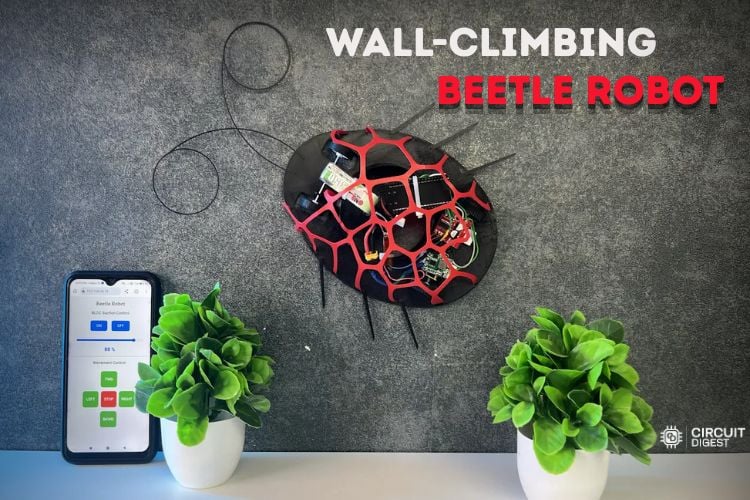
| S.non | Composant | Description | Quantité |
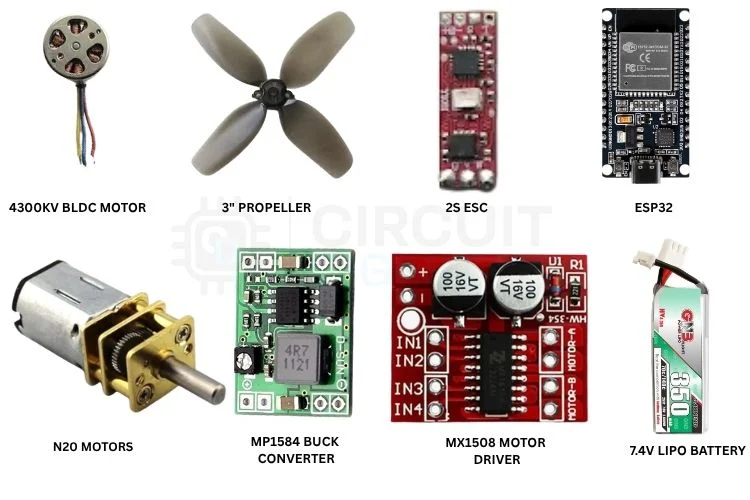
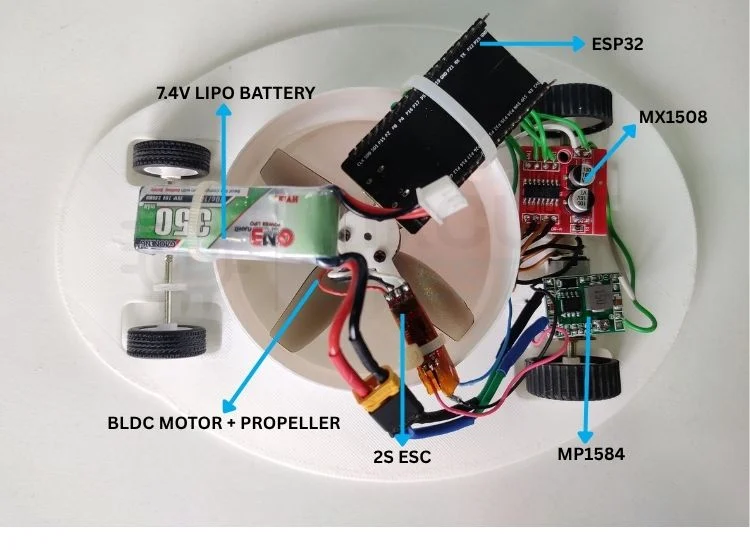
| 1 | Moteur CC sans balais 4300KV | Pour fournir la puissance d’aspiration/de maintien au robot | 1 |
| 2 | Hélice de drone de 3 pouces | Agit comme l’hélice principale | 1 |
| 3 | Carte de développement ESP32 | Contrôleur principal | 1 |
| 4 | Moteurs N20 100 tr/min | Pour assurer le mouvement du robot | 2 |
| 5 | Roues légères | Les roues avec poignées en caoutchouc offrent une meilleure traction | 4 |
| 6 | Contrôleur 2S, 6-8A | Piloter le moteur BLDC | 1 |
| 7 | Batterie Li-Po 7,4 V 300 mAh | Alimentez tout le robot | 1 |
| 8 | Pilote de moteur MX1508 | Pilotez les moteurs N20 | 1 |
| 9 |
Convertisseur Buck MP1584 |
Fournir 5 V stable à ESP32 | 1 |
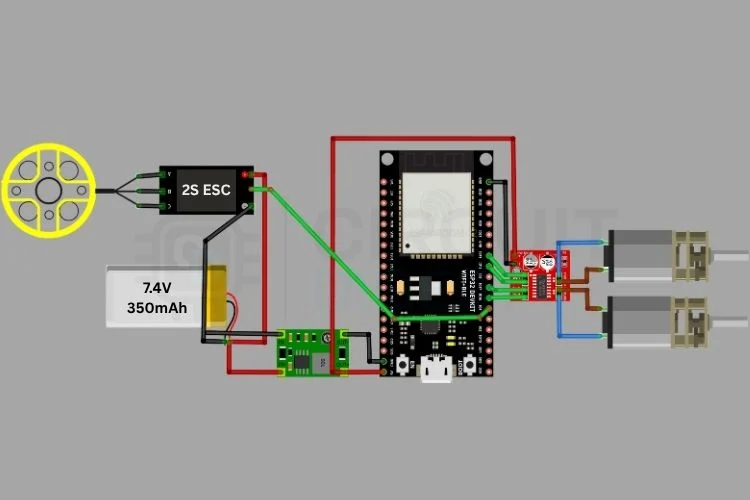
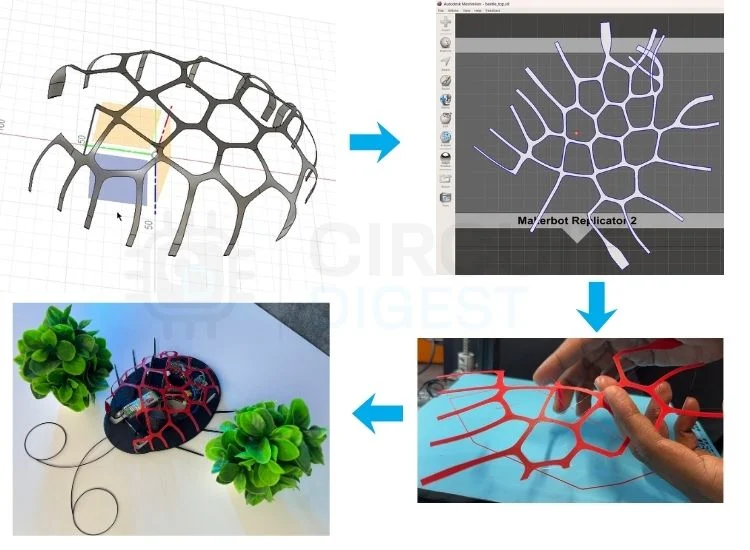
#include
#include
const char* ssid = "wifi_name";
const char* password = "wifi_password7";
WebServer server(80);
// ESC
const int escPin = 4;
const int pwmFreq = 50;
const int pwmResolution = 16;
// MX1508
const int L1 = 16;
const int L2 = 17;
const int R1 = 18;
const int R2 = 19;
bool bldcEnabled = false;
int throttle = 0;
uint32_t usToDuty(uint16_t us)
{
uint32_t maxDuty = (1UL << pwmResolution) - 1;
return (uint32_t)((us / 20000.0) * maxDuty);
}
void setThrottle(int percent)
{
if (!bldcEnabled)
{
ledcWrite(escPin, usToDuty(1000));
return;
}
percent = constrain(percent, 0, 100);
uint16_t pulse =
map(percent, 0, 100, 1000, 2000);
ledcWrite(escPin, usToDuty(pulse));
}void stopRobot()
{
digitalWrite(L1, LOW);
digitalWrite(L2, LOW);
digitalWrite(R1, LOW);
digitalWrite(R2, LOW);
}
void forward()
{
digitalWrite(L1, HIGH);
digitalWrite(L2, LOW);
digitalWrite(R1, HIGH);
digitalWrite(R2, LOW);
}
void backward()
{
digitalWrite(L1, LOW);
digitalWrite(L2, HIGH);
digitalWrite(R1, LOW);
digitalWrite(R2, HIGH);
}
void left()
{
digitalWrite(L1, LOW);
digitalWrite(L2, HIGH);
digitalWrite(R1, HIGH);
digitalWrite(R2, LOW);
}
void right()
{
digitalWrite(L1, HIGH);
digitalWrite(L2, LOW);
digitalWrite(R1, LOW);
digitalWrite(R2, HIGH);
}void handleRoot()
{
}void handleSpeed()
{
throttle =
server.arg("value").toInt();
setThrottle(throttle);
server.send(200, "text/plain", "OK");
}
void handleBLDCOn()
{
bldcEnabled = true;
setThrottle(throttle);
server.send(200, "text/plain", "ON");
}void setup()
{
}
The setup() initialises serial communication, configures the motor pins as outputs, prints the assigned IP address on the serial monitor and starts the web server.
void loop()
{
server.handleClient();
} 
Code de projet complet
Copier le code
#include
#include
const char* ssid = "your_ssid";
const char* password = "your-password";
WebServer server(80);
// ESC
const int escPin = 4;
const int pwmFreq = 50;
const int pwmResolution = 16;
// MX1508
const int L1 = 16;
const int L2 = 17;
const int R1 = 18;
const int R2 = 19;
bool bldcEnabled = false;
int throttle = 0;
uint32_t usToDuty(uint16_t us)
{
uint32_t maxDuty = (1UL << pwmResolution) - 1;
return (uint32_t)((us / 20000.0) * maxDuty);
}
void setThrottle(int percent)
{
 if (!bldcEnabled)
 {
   ledcWrite(escPin, usToDuty(1000));
   return;
 }
 percent = constrain(percent, 0, 100);
 uint16_t pulse =
     map(percent, 0, 100, 1000, 2000);
 ledcWrite(escPin, usToDuty(pulse));
}
// --------------------
// Robot Movement
// --------------------
void stopRobot()
{
 digitalWrite(L1, LOW);
 digitalWrite(L2, LOW);
 digitalWrite(R1, LOW);
 digitalWrite(R2, LOW);
}
void forward()
{
 digitalWrite(L1, HIGH);
 digitalWrite(L2, LOW);
 digitalWrite(R1, HIGH);
 digitalWrite(R2, LOW);
}
void backward()
{
 digitalWrite(L1, LOW);
 digitalWrite(L2, HIGH);
 digitalWrite(R1, LOW);
 digitalWrite(R2, HIGH);
}
void left()
{
 digitalWrite(L1, LOW);
 digitalWrite(L2, HIGH);
 digitalWrite(R1, HIGH);
 digitalWrite(R2, LOW);
}
void right()
{
 digitalWrite(L1, HIGH);
 digitalWrite(L2, LOW);
 digitalWrite(R1, LOW);
 digitalWrite(R2, HIGH);
}
void handleRoot()
{
String page = R"rawliteral(
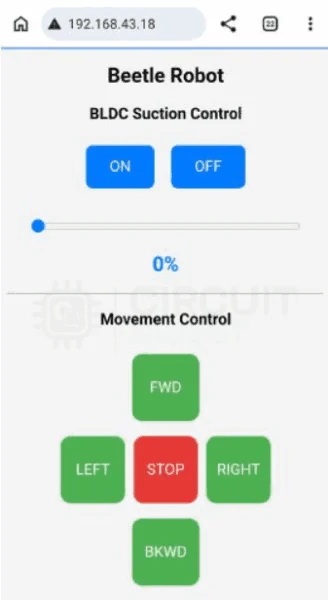
Wall Climbing Robot
BLDC Suction Control
ON
OFF
0%
Movement Control
FWD
LEFT
STOP
RIGHT
BKWD
)rawliteral";
server.send(200, "text/html", page);
}
// --------------------
// Web Requests
// --------------------
void handleSpeed()
{
throttle =
  server.arg("value").toInt();
setThrottle(throttle);
server.send(200, "text/plain", "OK");
}
void handleBLDCOn()
{
bldcEnabled = true;
setThrottle(throttle);
server.send(200, "text/plain", "ON");
}
void handleBLDCOff()
{
bldcEnabled = false;
setThrottle(0);
server.send(200, "text/plain", "OFF");
}
// --------------------
// Setup
// --------------------
void setup()
{
Serial.begin(115200);
Serial.println("Serial connected successfully!");
pinMode(L1, OUTPUT);
pinMode(L2, OUTPUT);
pinMode(R1, OUTPUT);
pinMode(R2, OUTPUT);
stopRobot();
ledcAttach(
escPin,
pwmFreq,
pwmResolution);
ledcWrite(
escPin,
usToDuty(1000));
delay(5000); // arm ESC
WiFi.begin(ssid, password);
while(WiFi.status()!=WL_CONNECTED)
{
delay(500);
Serial.print(".");
}
Serial.println();
Serial.println(WiFi.localIP());
server.on("https://raspberryme.com/", handleRoot);
server.on("/speed", handleSpeed);
server.on("/bldcOn", handleBLDCOn);
server.on("/bldcOff", handleBLDCOff);
server.on("/forward",
[](){ forward(); server.send(200); });
server.on("/backward",
[](){ backward(); server.send(200); });
server.on("/left",
[](){ left(); server.send(200); });
server.on("/right",
[](){ right(); server.send(200); });
server.on("/stop",
[](){ stopRobot(); server.send(200); });
server.begin();
}
void loop()
{
server.handleClient();
}
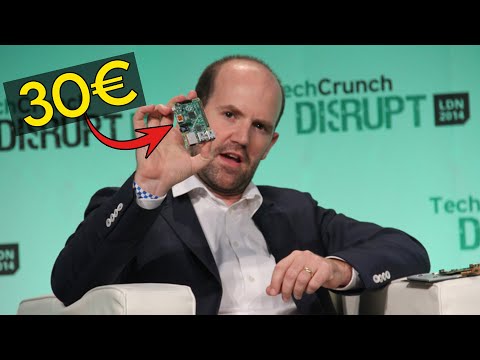
Retrouvez l’histoire de Raspberry Pi dans cette vidéo :
-
 LAFVIN Robot à cardan AI de bureau ESP32-S3 avec tutoriel | Interaction vocale, reconnaissance gestuelle, écran OLED de 2,44 cm, flash 16 Mo et 8 Mo PSRAM, terminal IA programmable pour
 -
 ANTHBOT Genie 800 Tondeuse robot sans câble de limitation, jusqu'à 1500 m² | Navigation RTK + 4K KI-Vision, cartographie automatique, contrôle par application et 4G, multi-zones, pente de 45 %