

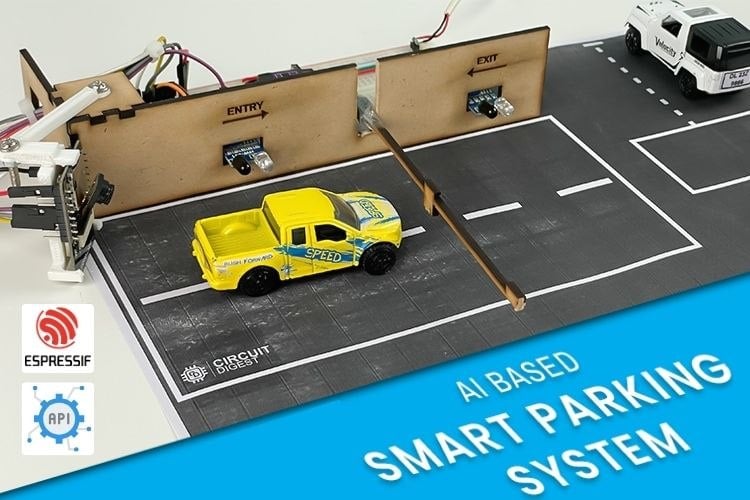
Code de projet complet
Copier de code
/*
* Smart Parking System using ESP32-CAM
*
* Features:
* - WiFi connectivity for communication with a remote server.
* - Secure HTTPS communication with the server using WiFiClientSecure.
* - Camera functionality to capture images for license plate recognition.
* - Integration with an NTP server for accurate timekeeping in Indian Standard Time (IST).
* - Real-time web server interface for monitoring parking system status.
* - Web page displays real-time information including current time, parking status, and captured images.
* - Image capture triggered by a POST request from the web interface.
* - Image upload to a remote server with automatic handling of responses.
* - Servo motor control to open and close the parking barrier based on vehicle entry/exit.
* - Detection of vehicle entry and exit using GPIO sensors.
* - Dynamic update of available parking spaces based on vehicle count.
* - Logging of valid number plates with timestamps for parking history.
*
* Working:
* 1. Connects to a specified WiFi network.
* 2. Initializes and configures the camera.
* 3. Sets up and starts a web server to handle client requests.
* 4. Establishes an NTP client to get the current time.
* 5. Continuously updates the web server with real-time status and parking information.
* 6. Handles image capture and upload when a POST request is received from the web interface.
* 7. Updates parking space availability and history based on the recognition results.
* 8. Controls the parking barrier using a servo motor, based on vehicle detection by sensors.
* 9. Provides a web interface that refreshes periodically to display updated information.
*
* Note:
* - Replace placeholders for WiFi credentials, server details, and API keys with actual values.
* - Ensure proper handling of HTTPS certificates and security measures for production use.
*/
// Libraries for WiFi, Secure Client, and Camera functionalities
#include
#include
#include
#include
#include "soc/soc.h"
#include "soc/rtc_cntl_reg.h"
#include "esp_camera.h"
#include
#include
#include
// WiFi credentials and server information
const char* ssid = "xxx"; // Replace xxx with your WiFi SSID
const char* password = "xxx"; // Replace xxx with your WiFi Password
String serverName = "www.raspberryme.cloud"; // Replace with your server domain
String serverPath = "/readnumberplate"; // API endpoint path "/readqrcode" or "/readnumberplate"
const int serverPort = 443; // HTTPS port
String apiKey = "xxx"; // Replace xxx with your API key
String imageViewLink = "https://www.raspberryme.cloud/static/" + apiKey + ".jpeg";
#define flashLight 4 // GPIO pin for the flashlight
int count = 0; // Counter for image uploads
WiFiClientSecure client; // Secure client for HTTPS communication
// Camera GPIO pins - adjust based on your ESP32-CAM board
#define PWDN_GPIO_NUM 32
#define RESET_GPIO_NUM -1
#define XCLK_GPIO_NUM 0
#define SIOD_GPIO_NUM 26
#define SIOC_GPIO_NUM 27
#define Y9_GPIO_NUM 35
#define Y8_GPIO_NUM 34
#define Y7_GPIO_NUM 39
#define Y6_GPIO_NUM 36
#define Y5_GPIO_NUM 21
#define Y4_GPIO_NUM 19
#define Y3_GPIO_NUM 18
#define Y2_GPIO_NUM 5
#define VSYNC_GPIO_NUM 25
#define HREF_GPIO_NUM 23
#define PCLK_GPIO_NUM 22
// Network Time Protocol (NTP) setup
const char* ntpServer = "pool.ntp.org"; // NTP server
const long utcOffsetInSeconds = 19800; // IST offset (UTC + 5:30)
int servoPin = 14; // GPIO pin for the servo motor
int inSensor = 13; // GPIO pin for the entry sensor
int outSensor = 15; // GPIO pin for the exit sensor
Servo myservo; // Servo object
int pos = 0; // Variable to hold servo position
// Initialize the NTPClient
WiFiUDP ntpUDP;
NTPClient timeClient(ntpUDP, ntpServer, utcOffsetInSeconds);
String currentTime = "";
// Web server on port 80
WebServer server(80);
// Variables to hold recognized data, current status, and history
String recognizedPlate = ""; // Variable to store the recognized plate number
String imageLink = ""; // Variable to store the image link
String currentStatus = "Idle"; // Variable to store the current status of the system
int availableSpaces = 4; // Total parking spaces available
int vehicalCount = 0; // Number of vehicles currently parked
int barrierDelay = 3000; // Delay for barrier operations
int siteRefreshTime = 1; // Web page refresh time in seconds
// History of valid number plates and their entry times
struct PlateEntry {
String plateNumber; // Plate number of the vehicle
String time; // Entry time of the vehicle
};
std::vector plateHistory; // Vector to store the history of valid plates
// Function to extract a JSON string value by key
String extractJsonStringValue(const String& jsonString, const String& key) {
int keyIndex = jsonString.indexOf(key);
if (keyIndex == -1) {
return "";
}
int startIndex = jsonString.indexOf(':', keyIndex) + 2;
int endIndex = jsonString.indexOf('"', startIndex);
if (startIndex == -1 || endIndex == -1) {
return "";
}
return jsonString.substring(startIndex, endIndex);
}
// Function to handle the root web page
void handleRoot() {
String html = "";
html += "";
html += "";
html += "Smart Parking System";
html += "";
html += ""; // Refresh every x second
html += "";
html += "";
html += "";
html += "";
html += "Time: " + currentTime + "
";
html += "Status: " + currentStatus + "
";
html += "Last Recognized Plate: " + recognizedPlate + "
";
html += "Last Captured Image: View Image
";
// html += "";
html += "Spaces available: " + String(availableSpaces - vehicalCount) + "
";
html += "Parking Database
";
if (plateHistory.empty()) {
html += "No valid number plates recognized yet.
";
} else {
html += "Plate Number Time " + entry.plateNumber + " " + entry.time + "
";
}
html += "";
html += "
Retrouvez l’histoire de Raspberry Pi dans cette vidéo :

-
 Radar De Recul Voiture Radar Recul Parktronic Intelligent pour Voiture Capteur Stationnement Plat 16,5 Mm Affichage Distance sur Écran Caméra(Noir)
 -
Radar De Recul Voiture Radar Recul Intelligent Parktronic Capteur Stationnement Plat 16,5 Mm Affichage Distance sur Écran Caméra(Noir)