

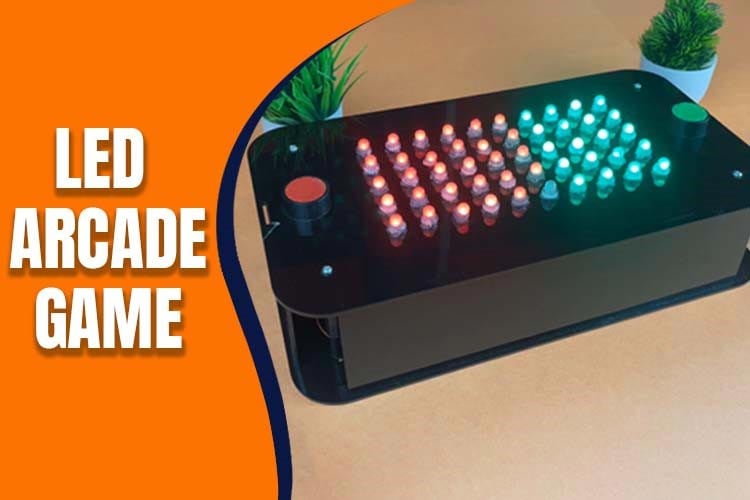
#include <FastLED.h>
#define LED_PIN 5
#define BUZZER_PIN 7
#define NUM_LEDS 50
#define BUTTON_PIN1 2
#define BUTTON_PIN2 3
#define DELAY_MS 50
#define RED_BUTTON_FREQ 100 // Frequency for the red button sound
#define GREEN_BUTTON_FREQ 200 // Frequency for the green button sound
CRGB leds[NUM_LEDS];
int ledCount1 = 0; // Number of red LEDs to light up from one end
int ledCount2 = 0; // Number of green LEDs to light up from the other end
bool buttonState1 = false;
bool lastButtonState1 = false;
bool buttonState2 = false;
bool lastButtonState2 = false;
bool isRedButtonPressed = false;
bool isGreenButtonPressed = false;
void setup() {
FastLED.addLeds<WS2812B, LED_PIN, GRB>(leds, NUM_LEDS);
pinMode(BUTTON_PIN1, INPUT_PULLUP);
pinMode(BUTTON_PIN2, INPUT_PULLUP);
pinMode(BUZZER_PIN, OUTPUT);
}
void loop() {
buttonState1 = digitalRead(BUTTON_PIN1) == LOW;
buttonState2 = digitalRead(BUTTON_PIN2) == LOW;
if (buttonState1 != lastButtonState1) {
if (buttonState1) {
// Button 1 is pressed
ledCount1++;
if (ledCount1 > NUM_LEDS) {
ledCount1 = NUM_LEDS;
}
isRedButtonPressed = true;
tone(BUZZER_PIN, RED_BUTTON_FREQ); // Play the red button sound
}
lastButtonState1 = buttonState1;
}
if (buttonState2 != lastButtonState2) {
if (buttonState2) {
// Button 2 is pressed
ledCount2++;
if (ledCount2 > NUM_LEDS) {
ledCount2 = NUM_LEDS;
}
isGreenButtonPressed = true;
tone(BUZZER_PIN, GREEN_BUTTON_FREQ); // Play the green button sound
}
lastButtonState2 = buttonState2;
}
// Turn off all LEDs
FastLED.clear();
// Light up the specified number of red LEDs from one end
for (int i = 0; i < ledCount1; i++) {
leds[i] = CRGB::Green;
}
// Light up the specified number of green LEDs from the other end
for (int i = NUM_LEDS - 1; i >= NUM_LEDS - ledCount2; i--) {
leds[i] = CRGB::Red;
}
if ((ledCount1 + ledCount2) >= NUM_LEDS) {
if (ledCount1 > ledCount2) {
greenChaserEffect();
} else if (ledCount2 > ledCount1) {
redChaserEffect();
} else {
// It's a tie
tieChaserEffect();
}
// Reset the LED counts
ledCount1 = 0;
ledCount2 = 0;
}
// Show the updated LED strip
FastLED.show();
if (isRedButtonPressed || isGreenButtonPressed) {
delay(50); // Adjust this delay to control the duration of the buzzer sound
noTone(BUZZER_PIN); // Stop the buzzer sound
isRedButtonPressed = false;
isGreenButtonPressed = false;
}
delay(50); // Adjust this delay to debounce the buttons and control the response speed
}
void tieChaserEffect() {
for (int i = 0; i < NUM_LEDS / 2; i++) {
leds[i] = CRGB::Red; // Set the color of the current LED to red
FastLED.show(); // Update the LED strip
delay(DELAY_MS); // Wait for a short period
}
for (int i = NUM_LEDS; i >= NUM_LEDS / 2; i--) {
leds[i] = CRGB::Green; // Set the color of the current LED to red
FastLED.show(); // Update the LED strip
delay(DELAY_MS); // Wait for a short period
}
}
void greenChaserEffect() {
// Set all LEDs to green initially
for (int i = 0; i < ledCount1; i++) {
leds[i] = CRGB::Green;
}
FastLED.show(); // Update the LED strip with the initial green color
for (int i = ledCount1; i < NUM_LEDS; i++) {
leds[i] = CRGB::Green; // Set the color of the current LED to red
FastLED.show(); // Update the LED strip
delay(DELAY_MS); // Wait for a short period
}
}
void redChaserEffect() {
// Set all LEDs to green initially
for (int i = NUM_LEDS - 1; i >= NUM_LEDS - ledCount2; i--) {
leds[i] = CRGB::Red;
}
FastLED.show(); // Update the LED strip with the initial green color
for (int i = ledCount2; i > 0; i--) {
leds[i] = CRGB::Red; // Set the color of the current LED to red
FastLED.show(); // Update the LED strip
delay(DELAY_MS); // Wait for a short period
}
}
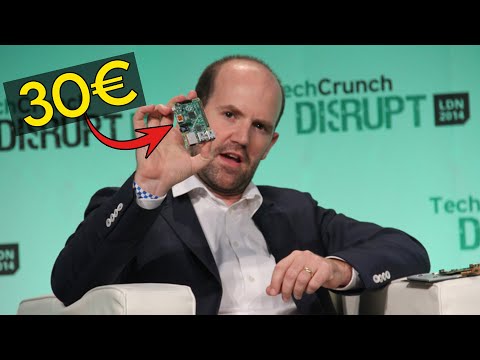
Retrouvez l’histoire de Raspberry Pi dans cette vidéo :
-
 Jeu d'Arcade Interactif avec LED et Musique pour Anniversaires Black | Créez une ambiance festive avec des lumières colorées, de la musique et un compte à rebours.
 -
 Jeu d'Arcade Interactif avec LED et Musique pour Anniversaires Yellow | Créez une ambiance festive avec des lumières colorées, de la musique et un compte à rebours.